
Robo Surf1.07 - Google Play
You'll be able to see results in few seconds.
Publisher Description
Make sure to check out our latest Roby game - Roby Tumbler!
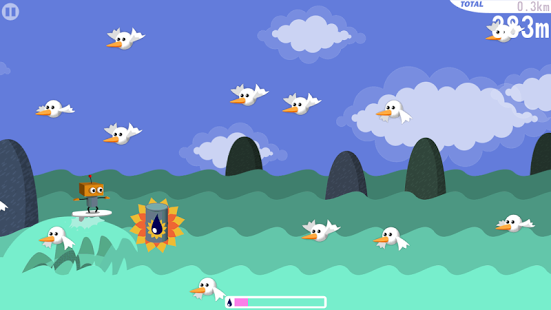
What would you do if you were the last robot on Earth? You'd surf of course!
Find the biggest wave and surf far over the flooded surface of the world. Robo the robot collects oil barrels left at sea that will fill up his turbo power. Whoosh! As the turbo is ignited Robo turns into a fireball boosting forward some hundred meters.
Look out for flocks of seagulls - they may end Robo's ride prematurally. And beware of the five terrors of the sea, lurking beneath the surface.
- Simple one-touch gameplay to ride the waves, plus swiping for turbo!
- Play as indie game superstars: Iji and Blueberry Garden dude
- Fight the five terrors of the sea in intense boss battles!
- Surf as far as you can or get a quick fix in the additional game mode
- Many different regions to discover!
Some reviews:
"It's hard for a game to stand out in such a crowded genre, but this one shines"
-Toucharcade.com
"Robo Surf is simple, fun and cheap. What more could you ask for?"
-Gamertell.com
"Robo Surf gets everything right with quality checkpoints, boss battles, easy and smooth controls, and a gameplay style that you just can’t put down"
-Applnapps.com
"The game's a ton of fun and shockingly addictive. It literally came out of nowhere"
-Modojo.com
"Instead of turning on Call of Duty on the Playstation, I prefer to surf a few minutes a day with a little robot"
-iTok.pl
"Robo Surf manages to combine all the aspects of good gaming in a neat and accessible package"
-Digitallydownloaded.net
About Robo Surf
The company that develops Robo Surf is Pieces Interactive AB. The latest version released by its developer is 1.07.
To install Robo Surf on your Android device, just click the green Continue To App button above to start the installation process. The app is listed on our website since 2013-09-20 and was downloaded 0 times. We have already checked if the download link is safe, however for your own protection we recommend that you scan the downloaded app with your antivirus. Your antivirus may detect the Robo Surf as malware as malware if the download link to se.piecesinteractive.robosurf is broken.
How to install Robo Surf on your Android device:
- Click on the Continue To App button on our website. This will redirect you to Google Play.
- Once the Robo Surf is shown in the Google Play listing of your Android device, you can start its download and installation. Tap on the Install button located below the search bar and to the right of the app icon.
- A pop-up window with the permissions required by Robo Surf will be shown. Click on Accept to continue the process.
- Robo Surf will be downloaded onto your device, displaying a progress. Once the download completes, the installation will start and you'll get a notification after the installation is finished.
Program Details
System requirements
Download information
Pricing
Version History
version 1.07
posted on 2013-09-20
-Play as the new character from Roby Tumbler,-Updated menu,-Updated icon,-Added intro video,-Improved swipe functionality,-Added cross game promotion for Roby Tumbler
version 1.06
posted on 2013-07-02
Several fixes and updates
Disclaimer
Official Google Play Link
We do not host Robo Surf on our servers. We did not scan it for viruses, adware, spyware or other type of malware. This app is hosted by Google and passed their terms and conditions to be listed there. We recommend caution when installing it.
The Google Play link for Robo Surf is provided to you by apps112.com without any warranties, representations or guarantees of any kind, so access it at your own risk.
If you have questions regarding this particular app contact the publisher directly. For questions about the functionalities of apps112.com contact us.
